
Introduction: Playing Games Without a Powerful PC
Imagine playing a high-end game on a basic laptop, tablet, or even your phone—without downloading large files or buying expensive hardware. You open the game, press play, and it just works. No long installs. No hardware upgrades. That simple idea is the foundation of cloud gaming.
For beginners, cloud gaming can feel confusing at first. Where is the game actually running? Why does internet speed matter so much? And is it really good enough for everyday gaming?
This article explains cloud gaming step by step in simple language, so you can clearly understand what it is, how it works, and when it makes sense to use it.
What Is Cloud Gaming?
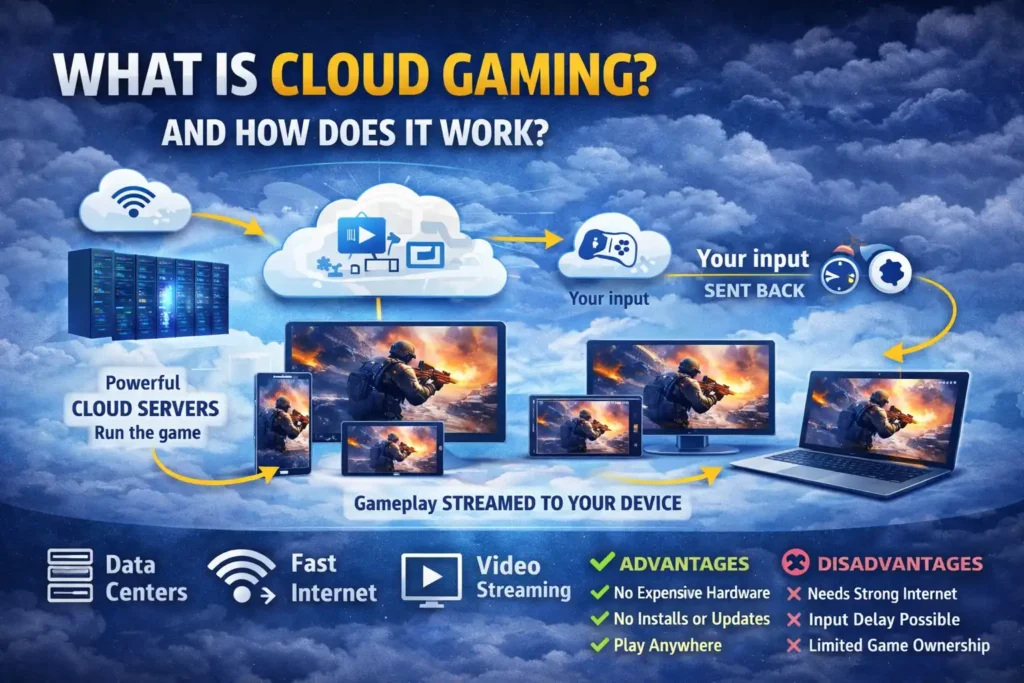
Cloud gaming is a way to play video games without running them on your own device.
Instead of your PC or console doing all the work, the game runs on powerful computers (servers) located in data centers. These servers stream the game to you over the internet, similar to how Netflix streams movies.
Your device becomes a screen and controller, not the engine.
In simple terms:
- The game runs in the cloud
- You see the video on your screen
- Your inputs (keyboard, mouse, controller) are sent back to the server in real time
Because of this, even low-end devices can run demanding games.
How Cloud Gaming Works (Step by Step)
Step 1: The Game Runs on a Remote Server
When you start a game, it launches on a powerful cloud server with high-end CPUs and GPUs. These servers are much stronger than most home PCs.
Step 2: The Game Is Streamed to You
The server captures the game’s video output and streams it to your device as a live video feed, similar to a live broadcast.
Step 3: You Send Input Back
When you press a button or move the mouse:
- Your input is sent to the server
- The server processes it instantly
- The updated game image is streamed back to you
This happens many times per second.
Step 4: The Loop Continues
This constant back-and-forth is what allows cloud gaming to feel interactive instead of like watching a video.
The biggest challenge here is latency, which is the delay between your input and what you see on screen.
Key Components of Cloud Gaming
1. Powerful Data Centers
Cloud gaming relies on data centers filled with high-performance gaming hardware. These systems handle graphics rendering, physics, and game logic.
2. Fast and Stable Internet
A stable internet connection is more important than raw speed.
Typical requirements:
- 10–15 Mbps for 720p
- 20–30 Mbps for 1080p
- Higher for 4K streaming
Consistency matters more than peak speed.
3. Video Compression Technology
The game’s video stream is compressed in real time to reduce bandwidth usage while maintaining visual quality.
4. Input Synchronization
Special systems ensure your inputs are processed quickly to keep gameplay responsive.
Advantages of Cloud Gaming
No Expensive Hardware Needed
You don’t need a gaming PC or console. Even older devices can run modern games.
No Downloads or Updates
Games start almost instantly. Updates and patches are handled on the server side.
Play Anywhere
You can switch between devices easily:
- Start on a PC
- Continue on a tablet
- Finish on a phone
Lower Entry Cost
For beginners, cloud gaming reduces the cost of getting into gaming.
Disadvantages of Cloud Gaming
Internet Dependency
If your internet drops or becomes unstable, gameplay suffers or stops completely.
Latency Issues
Fast-paced competitive games can feel less responsive, especially in regions far from data centers.
Image Quality Limits
Even at high settings, video compression can reduce sharpness compared to local gaming.
Limited Ownership
You are accessing games through a service, not owning physical or local copies.
Cloud Gaming vs Traditional Gaming
Traditional Gaming
- Games run on your device
- Best visual quality and lowest input lag
- Requires expensive hardware
- Downloads and updates required
Cloud Gaming
- Games run on remote servers
- Device hardware matters less
- Depends heavily on internet quality
- Faster access, lower setup effort
Neither approach is “better” for everyone—it depends on your needs.
Practical Use Cases of Cloud Gaming
Casual and Story-Based Games
Cloud gaming works very well for single-player and story-driven games where slight latency isn’t critical.
Trying Games Before Committing
Players can test games without installing large files or upgrading hardware.
Gaming on Low-End Devices
Students, travelers, or casual gamers can play modern games on basic systems.
Temporary Gaming Setup
If your main PC is unavailable, cloud gaming can act as a backup option.
Common Misunderstandings About Cloud Gaming
- ❌ It does not download games in the background
- ❌ It does not use your device’s GPU
- ❌ It is not the same as remote desktop gaming
- ❌ It does not eliminate latency entirely
Understanding these points helps set realistic expectations.
Real-World Examples
Popular cloud gaming services include platforms like Xbox Cloud Gaming and GeForce NOW. These services show how cloud gaming can work across multiple devices without local hardware upgrades.
Each service has different game libraries, performance limits, and supported regions.
Conclusion: Is Cloud Gaming Worth It?
Cloud gaming is not magic, but it is a practical solution for many gamers. It removes hardware barriers, reduces setup time, and makes gaming more accessible worldwide.
For beginners, it offers an easy way to experience modern games without major investment. For competitive or performance-focused players, traditional gaming still delivers the best responsiveness.
As internet infrastructure improves, cloud gaming will continue to evolve. Understanding how it works helps you decide whether it fits your gaming style—now or in the future.
How to Improve Gaming Performance Without Buying New Hardware